Binary Search Functions
In this lesson we will learn about the built-in binary search functions
While it is really important how the binary search algorithm works, when we need the most basic version of it, it is both faster and smarter to use the built in functions
There are three of them, and just like sort(), they take the range a.begin(), a.end() and only work when the array is sorted.
binary_search
Code: binary_search(a.begin(), a.end(), k)
This version returns true if k exists in the array, false otherwise.
lower_bound
This is the one you will use the most.
Code: lower_bound(a.begin(), a.end(), k)
This version finds the first element that is >= k.
The interesting thing is that it doesn't return an index, it returns a pointer (the same kind of thing as a.begin()). To turn it into an index, we subtract the beginning of the array:
int i = lower_bound(a.begin(), a.end(), k) - a.begin();
Think of it like street numbers, the pointer is a house's address. a.begin() is where the street starts, so their difference is the house number.
upper_bound
Code: upper_bound(a.begin(), a.end(), k)
It is almost the same, but finds the first element that is strictly greater than k ( >k ).
The names are easy to mix up, so remember it this way: for the value 3 in the array below, lower_bound points to the start of the 3's, and upper_bound to just after the end of them.
| index | 0 | 1 | 2 | 3 | 4 | 5 |
|---|---|---|---|---|---|---|
| value | 1 | 3 | 3 | 5 | 8 | 10 |
| lower_bound | upper_bound |
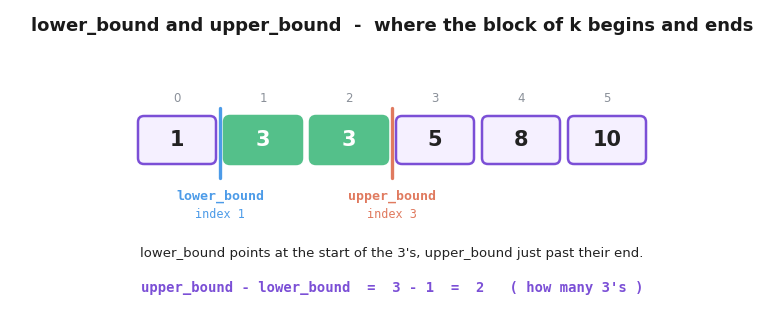
That gives us a handy bonus trick - the number of times k appears is simply upper_bound - lower_bound (the size of that block)!
All three functions run in O(log n) per call.
Elements not in the array?
When no element satisfies the condition, both functions return a.end() - one position past the last element. So the index we get equals a.size().
Always check for this case before using the result as an index.
if(i == a.size())means "not found", and readinga[i]will throw an error!
Summary
Most problems that use binary search in the solution will either require a custom function (like what we did in the earlier lesson), or they will require lower_bound() to get a specific index. That is why it's important to know it.