Bitwise Operations
In this lesson we will learn about operations that directly affect the bits of a number!
As we know, integers in code are represented with a series of 0's and 1's that are most commonly 32-bit or 64-bit.
There are some operations that work and affect with these bits in various ways, so let's go over them:
When working with bitwise operations, it is best to use unsigned integers!
Bitwise Not (~)
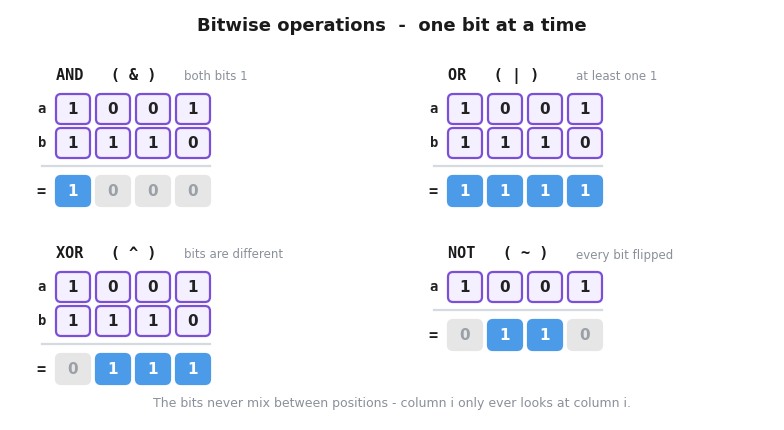
The bitwise not operator simply flips all the bits in a number.
For example:
If we had a = 1001
Then ~a = 0110
Code:
int main(){

    unsigned int a =1;

	cout<<a<<'\n';
	cout<<~a;
}
Output:
1
4294967294
Since 1 = 0000 0000 0000 0000 0000 0000 0000 0001
And 4294967294 = 1111 1111 1111 1111 1111 1111 1111 1110
Bitwise Shift (>>, <<)
The bitwise shift moves all the bits in a number to the left, or to the right.
We can choose how many spaces the bits are moved:
a = 0011
a<<2 = 1100
Or:
a = 0111
a>>1 = 0011
If the bits go out of bounds, they are effectively deleted (zeros come in to fill their space, either from the left, or from the right).
int main(){

    unsigned int a =1;
    unsigned int b = a<<3;

	cout<<a<<'\n';
	cout<<b;
}
Output:
1
8
Since 1 = 0000 0000 0000 0000 0000 0000 0000 0001
And 8 == 0000 0000 0000 0000 0000 0000 0000 1000
An interesting thing about shift, is that we can get powers of 2 pretty easily, as 2^x is the same as 1<<x.
This is because we are working with the binary system, and shifting left by one position multiplies by 2 (assuming of course there is enough space for it to fit).
Bitwise AND (&)
Bitwise and (Not to be confused with logical and &&) works with 2 numbers, and does the following operation on each bit:
- Compare the
i-thbit of the first number with thei-thbit of the second number - If both are
1return1, otherwise return0
Example:
a = 1001
b = 1110
a & b = 1000
This means that
&can function as a mask, only letting certain bits through. This is really important to remember
int main(){

    unsigned int a =12;
    unsigned int b = 6;

    unsigned int c = a & b;

	cout<<c;
}
Output: 4
Since:
a = 12 = 0000 0000 0000 0000 0000 0000 0000 1100
b = 6 == 0000 0000 0000 0000 0000 0000 0000 0110
c = a & b = 0000 0000 0000 0000 0000 0000 0000 0100 = 4
Another thing to note is that for unsigned integers,
a & b <= min(a,b).
Bitwise OR (|)
Bitwise or (Not to be confused with logical or ||) also works with 2 numbers, and does the following operation on each bit:
- Compare the
i-thbit of the first number with thei-thbit of the second number - If both bits are
0, return0, otherwise return1
Example:
a = 1001
b = 1110
a | b = 1111
int main(){

    unsigned int a =12;
    unsigned int b = 6;

    unsigned int c = a | b;

	cout<<c;
}
Output: 14
Since:
a = 12 = 0000 0000 0000 0000 0000 0000 0000 1100
b = 6 == 0000 0000 0000 0000 0000 0000 0000 0110
c = a | b = 0000 0000 0000 0000 0000 0000 0000 1110 = 14
Bitwise XOR (^)
Bitwise xor is an interesting operation, it works on 2 numbers and does:
- Compare the
i-thbit of the first number with thei-thbit of the second number - If the bits are different, return
1, otherwise return0
Example:
a = 1001
b = 1110
a ^ b = 0111
Code:
int main(){

    unsigned int a =12;
    unsigned int b = 6;

    unsigned int c = a ^ b;

	cout<<c;
}
Output: 10
Since:
a = 12 = 0000 0000 0000 0000 0000 0000 0000 1100
b = 6 == 0000 0000 0000 0000 0000 0000 0000 0110
c = a ^ b = 0000 0000 0000 0000 0000 0000 0000 1010 = 10
There are many interesting properties of xor, one of which is that XOR allows you to recover one operand if you know the other operand and the XOR result. Specifically if:
c = a ^ b,
then a = c ^ b
and b = c ^ a
More properties are:
x ^ x = 0 (If we XOR a number with itself, we get 0)
And:
x ^ 0 = x (If we XOR a number with 0, we get that number)
Note:
We can also use the equal sign when using bitwise operations:
a &= b; same as a = a & b;
a |= b; same as a = a | b;
a ^= b; same as a = a ^ b;
a <<= n; same as a = a << n;
a >>= n; same as a = a >> n;