Lines
In this lesson we finally put the cross product to work - and it turns out that almost every question about lines is the same question in disguise.
Before we start, one word about naming. A line goes on forever in both directions. A segment is the piece between two points, and it stops there. We store both in exactly the same way - two points A and B - so the difference lives only in our head: are we allowed to walk past A and B or not. Most problems are about segments, so we will be careful about this every time it matters.
Orientation
Take a line through A and B, and a third point C. There are exactly three possibilities: C is to the left of the line, to the right of it, or exactly on it.
To find out which, we build the vectors and and look at the sign of :
- positive - to get from to we turn counter-clockwise, so
Cis on the left - negative - we turn clockwise, so
Cis on the right - zero - the vectors are parallel, so
Clies on the lineAB
Left and right are meant from the point of view of somebody standing at A and looking towards B. Swap A and B and every sign flips, which makes sense - the person turned around.
Don't worry too much about what is "left" and what is "right", as all that matters is comparing >0 or <0
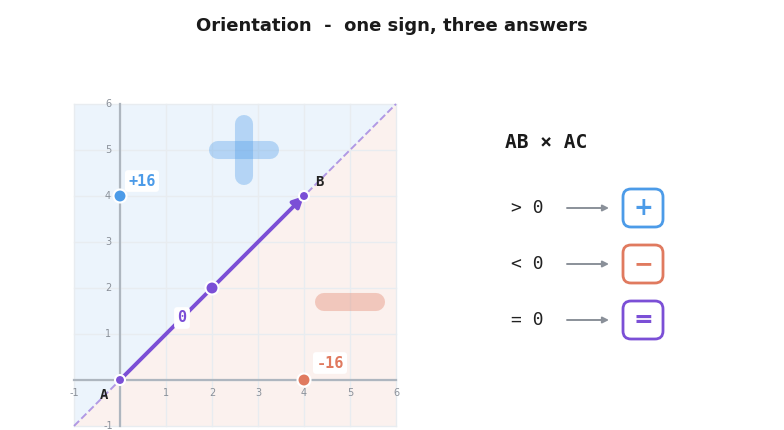
We will use this constantly, so let's wrap it in a function. Notice that it returns a character and not a number: the actual value of the cross product is never interesting here, only its sign.
#include <bits/stdc++.h>

using namespace std;

struct v{

    long long x, y;
};

v sub(v a, v b){

    return {a.x - b.x, a.y - b.y};
}

long long cross(v a, v b){

    return (a.x * b.y) - (a.y * b.x);
}

char orientation(v a, v b, v c){ // where is c, relative to the line ab

    long long prod = cross(sub(b, a), sub(c, a));

    if(prod > 0){
        return '+';
    }

    if(prod < 0){
        return '-';
    }

    return '=';
}

int main(){

    v a = {0, 0};
    v b = {4, 4};

    cout<<orientation(a, b, {0, 4})<<'\n'; //left
    cout<<orientation(a, b, {4, 0})<<'\n'; //right
    cout<<orientation(a, b, {2, 2})<<'\n'; //on the line

    return 0;
}
Output:
+
-
=
Every snippet from here on assumes these functions are already written above it.
Is a point on a segment
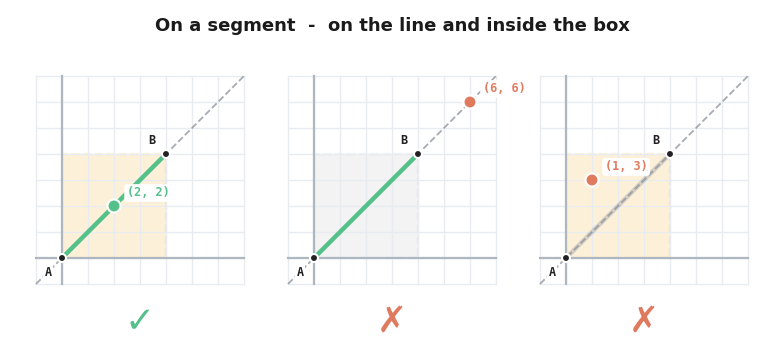
Getting = back from orientation means C is on the line AB - the infinite one. The point (6, 6) is on the line through (0,0) and (4,4), even though it sits well past B.
For a segment we need one more check: the point has to be between A and B. Because we already know it is on the line, we do not need anything clever - it is enough that its coordinates are inside the box spanned by A and B.
bool inBox(v a, v b, v p){

    return min(a.x, b.x) <= p.x && p.x <= max(a.x, b.x) &&
           min(a.y, b.y) <= p.y && p.y <= max(a.y, b.y);
}

bool onSegment(v a, v b, v p){

    return orientation(a, b, p) == '=' && inBox(a, b, p);
}

int main(){

    v a = {0, 0};
    v b = {4, 4};

    cout<<onSegment(a, b, {2, 2})<<'\n'; //on the line and inside the box
    cout<<onSegment(a, b, {6, 6})<<'\n'; //on the line, but past b
    cout<<onSegment(a, b, {1, 3})<<'\n'; //inside the box, but not on the line

    return 0;
}
Output:
1
0
0
The trap: = is not a side
Sooner or later we will want to compare two orientations. The classic case is asking whether C and D are on the same side of the line AB - both on the left means both are +, both on the right means both are -, so we just compare the two characters:
bool sameSide(v a, v b, v c, v d){

    return orientation(a, b, c) == orientation(a, b, d);
}

int main(){

    v a = {0, 0};
    v b = {4, 4};

    cout<<sameSide(a, b, {0, 4}, {4, 0})<<'\n'; //one on each side
    cout<<sameSide(a, b, {1, 1}, {3, 3})<<'\n'; //both lie ON the line

    return 0;
}
Output:
0
1
The first line is right. The second one is the trap. Both points lie on the line, so both calls return =, the characters match, and the function reports that they are on the same side - even though = is not a side at all.
There is no correct answer we can just pick here, what happens depends on the problem.
Whenever a statement says something like "strictly inside" or "without touching", the = case is exactly what it is talking about. Read it carefully and decide what = should mean before writing the comparison.