Sets
In this lesson we will learn about the map's simpler sibling - the Set!
Sometimes we do not need to store anything next to a key. We only care about which keys are there at all: "have I seen this number before?", "how many different words appear in this text?".
For that we have the set - a collection that stores elements, keeps them sorted, and never keeps the same element twice.
Adding an element that is already inside simply does nothing. That single rule is what makes sets so pleasant: we never have to check for duplicates ourselves.
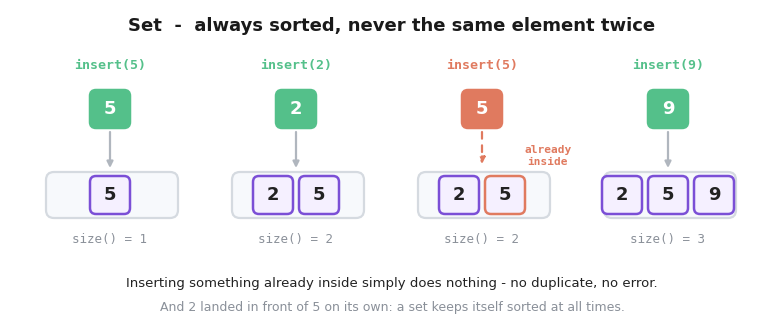
Initialization: set<int> s
The functions
| Function | What it does | Complexity |
|---|---|---|
insert(x) |
adds x (does nothing if it is already inside) |
O(log n) |
erase(x) |
removes x (does nothing if it is not inside) |
O(log n) |
count(x) |
returns 1 if x is inside, 0 if it is not |
O(log n) |
find(x) |
returns a pointer to x, or s.end() if x is not inside |
O(log n) |
size() |
number of elements | O(1) |
empty() |
returns true if the set is empty |
O(1) |
clear() |
removes everything | O(n) |
There is no s[i]. A set is not an array - we cannot ask for "the third element". It only answers the question of whether something is inside, and it hands the elements back to us in order.
Example:
int main(){

    set<int> s;

    s.insert(5);
    s.insert(2);
    s.insert(5); //already inside, nothing happens
    s.insert(9);

    cout<<s.size()<<'\n';
    cout<<s.count(2)<<'\n';
    cout<<s.count(7)<<'\n';

    s.erase(2);

    cout<<s.size();

    return 0;
}
Output:
3
1
0
2
Going through a set
Just like with a map, walking through a set gives the elements in increasing order:
Example:
int main(){

    vector<string> words = {"cp", "learn", "cp", "to", "learn"};

    set<string> different;

    for(int i=0;i<words.size();i++){
        different.insert(words[i]);
    }

    cout<<different.size()<<'\n';

    for(auto w : different){
        cout<<w<<'\n';
    }

    return 0;
}
Output:
3
cp
learn
to
A few lines gave us both the number of different words and a sorted list of them - two jobs that would otherwise need sorting plus a manual pass to remove duplicates.
The smallest and the largest
Because a set is always sorted, its first element is the smallest one and its last element is the largest one - and both are available instantly:
Example:
int main(){

    set<int> s = {7, 2, 9, 4};

    cout<<*s.begin()<<'\n';  //the smallest
    cout<<*s.rbegin()<<'\n'; //the largest

    s.erase(s.begin()); //remove the smallest

    cout<<*s.begin();

    return 0;
}
Output:
2
9
4
begin() points at the first (smallest) element and rbegin() at the last (largest) one. Those are pointers, which we will cover properly later - for now all we need is that the * in front means "the value this pointer is pointing at". Both are O(1), so at any moment a set gives us the current minimum and maximum for free.
find
count(x) answers the question "is it inside?". Very often we need more than that - we need to know where the element is. That is the job of find(x): it returns a pointer to the element, or s.end() if the element is not there.
s.end() is the marker for "past the last element". It is not an element itself, so reading it with * crashes the program - that is why we always compare the result of find against s.end() before using it.
Example:
int main(){

    set<int> s = {10, 20, 30};

    if(s.find(20) != s.end()){
        cout<<"20 is inside"<<'\n';
    }

    if(s.find(25) == s.end()){
        cout<<"25 is not inside"<<'\n';
    }

    auto it = s.find(30);

    cout<<*it<<'\n';

    s.erase(it); //we erase through the pointer

    cout<<s.size();

    return 0;
}
Output:
20 is inside
25 is not inside
30
2
If count already tells us whether something is inside, why bother with find? Two reasons:
- Erasing.
s.erase(it)removes exactly the element the pointer is aimed at, and it does not have to search for it again. Writingif(s.count(x)) s.erase(x);searches the set twice;findsearches once. - Neighbours. Once we hold a pointer to an element,
it++moves it to the next larger element andit--to the next smaller one. That turns a set into a structure where we can ask "what is right next to this value?" - something that comes up constantly.
Note:
Be careful with the edges:it++on the last element takes us tos.end(), andit--ons.begin()is undefined behaviour. Checkit != s.begin()andit != s.end()before stepping.
Searching inside a set
A set is sorted, so we can binary search it. But careful: the lower_bound(a.begin(), a.end(), x) we learned for vectors is O(n) on a set, because a set cannot jump to its middle element the way an array can. The set comes with its own version, s.lower_bound(x), which is O(log n) - that is the one to use.
Example:
int main(){

    set<int> s = {10, 20, 30, 40};

    cout<<*s.lower_bound(25)<<'\n'; //the first element >= 25
    cout<<*s.upper_bound(30)<<'\n'; //the first element > 30

    if(s.lower_bound(100) == s.end()){
        cout<<"nothing is >= 100";
    }

    return 0;
}
Output:
30
40
nothing is >= 100
Both of them return a pointer, exactly like find, and when no such element exists we get s.end() again - so the same rule applies: whenever the answer might not exist, compare against s.end() before reading it.
unordered_set and multiset
The set has the same two relatives the map does:
set |
unordered_set |
multiset |
|
|---|---|---|---|
| Order | sorted | arbitrary | sorted |
| Duplicates | not kept | not kept | kept |
| Operations | O(log n) | O(1) on average | O(log n) |
lower_bound |
yes | no | yes |
unordered_set trades the order for speed, exactly like unordered_map - including the same weakness, where a specially built input can push it to O(n) per operation.
multiset goes the other way and keeps duplicates, which is useful when we need a sorted collection that can hold the same value several times.
Note:
One trap withmultiset:s.erase(x)removes every copy ofxat once. To remove only one, writes.erase(s.find(x))- but only when you are surexis actually inside.
Note:
A set is really just a map with no values attached. Anything aset<int>can do, amap<int, bool>can do too - the set is simply clearer and lighter. The moment you need to attach information to each element, that is the signal to switch to a map.