Vectors
In this lesson we will learn about vectors - the object that almost every geometry problem is actually built out of (not to be confused with the data structure).
What is a vector
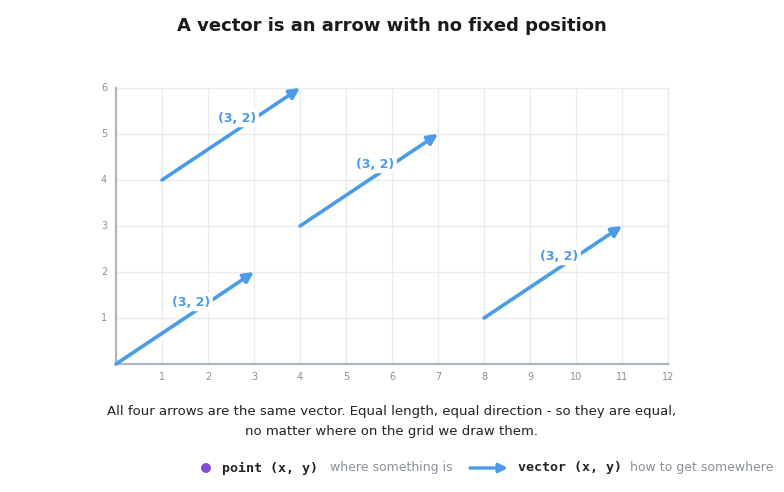
A vector is an arrow: it has a direction and a length, but it does not have a fixed position. We write it as a pair of numbers, , which we read as "move x to the right and y up".
So a point and a vector are stored in exactly the same way - as two numbers. The difference is only in how we think about them:
- a point is a place (where something is)
- a vector is a movement (how to get somewhere)
Two arrows that are equally long and point in the same direction are the same vector, no matter where we draw them. That is what "no fixed position" means, and it is the reason vectors are so convenient: we can move them around freely to wherever the calculation needs them.
From points to vectors
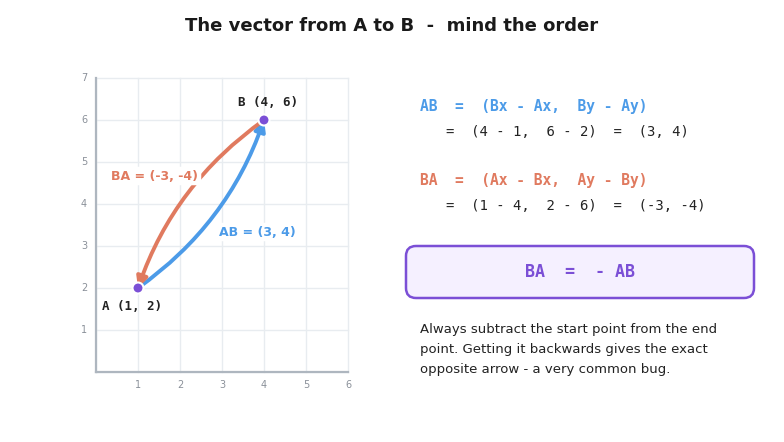
The vector that takes us from point A to point B is just the difference of their coordinates:
This is the single most used operation in geometry problems. Almost every task starts by taking the points from the input and turning them into vectors - and from that moment on we work only with vectors.
For example, for A = (1, 2) and B = (4, 6):
Which says exactly what we expect: to get from A to B we move 3 right and 4 up.
Careful with the order: is not the same as , it is the exact opposite arrow, . Subtracting in the wrong order is one of the most common bugs in geometry code.
Operations on vectors
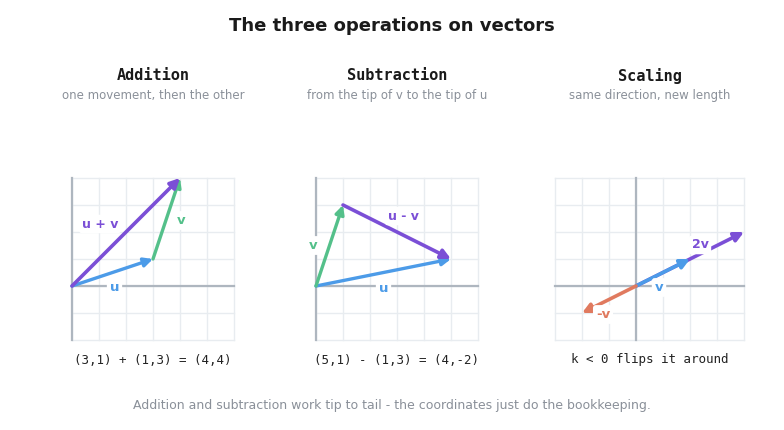
There are three basic things we can do with vectors:
Addition - doing one movement after the other:
Subtraction - the movement from the tip of to the tip of :
Scaling - stretching the arrow by a number k. The direction stays the same and the length gets multiplied by k; a negative k flips the arrow around:
Length of a vector
A vector has a length (also called its intensity), and it is exactly the distance formula from the previous lesson:
Implementation
In C++ we can write all of this as a few small functions next to our struct.
#include <bits/stdc++.h>

using namespace std;

struct v{

    long long x, y;
};

v add(v a, v b){

    return {a.x + b.x, a.y + b.y};
}

v sub(v a, v b){

    return {a.x - b.x, a.y - b.y};
}

v scale(v a, long long k){

    return {a.x * k, a.y * k};
}

long long len2(v a){ // squared length - stays an integer!

    return a.x * a.x + a.y * a.y;
}

double len(v a){

    return sqrt((double)len2(a));
}

double dist(v a, v b){

    return len(sub(b, a));
}

int main(){

    v a = {1, 2};
    v b = {4, 6};

    v ab = sub(b, a); // the vector from a to b

    cout<<"Vector AB: ("<<ab.x<<", "<<ab.y<<")\n";
    cout<<"Length: "<<len(ab)<<'\n';
    cout<<"Distance from a to b: "<<dist(a, b);

    return 0;
}
Output:
Vector AB: (3, 4)
Length: 5
Distance from a to b: 5
Summary
| Operation | Formula | Note |
|---|---|---|
Vector A to B |
subtract the start point | |
| Addition | one movement after another | |
| Subtraction | mind the order | |
| Scaling | negative k flips it |
|
| Length | same formula as distance |
Vectors are the main tool we use to solve geometry problems, and in the next lessons we will see how to use them!